


DIGITAL FORMS
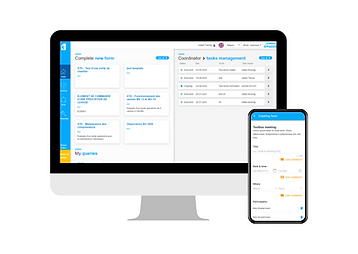
Convert paper forms to digital and fill them offline or online from your smartphone, tablet or desktop

CENTRALIZE DATA
Consult and download data of submitted forms, signatures and improve reporting

INTEGRATED WORKFLOWS
Manage workflows with tasks and actions for your team to execute and follow-up on
More information
Available for
Android: Smartphone and tablet
Web
User base
38 forms templates already available, including Observations, Safety visits, Toolbox meeting, etc.
Need help?
New in LORINFORMS
We are constantly striving to improve our products. These are the last updates we made.
Version 3.0.6 - January 2024
ℹ️ Instructions in form fields, 🔓 Possibility to limit the overview to 1 month history, 📎 PDF style improvement and more
-
Possibility to limit the overview to 1 month history You will be able to define, for the Overview Grid, if you want to see the forms created in the last month or the entire history. The switch can be changed at any time and the grid will be updated. This setting is also available on the mobile application.
-
new alert field: Action Taken A new field has been added for alerts “Alerts taken”. In this field, you can define if any action was taken for this alert.
-
New status: Obsolete A new status was defined for forms. This status can be manually set for a form to define this form is a duplicate, out of date,…
-
UX improvements
-
Save as draft improvement on mobile
-
Overview grid improvement
-
Mobile synchronisation improvements
-
Form creator as an optional column in task grid
-
etc.
-
Version 3.0.4 - June 2023
🔓 Possibility to limit the overview for basic users, ℹ️ Instructions in form fields, ✍️ Multi-signatures field, 📎 PDF style improvement and more
-
Possibility to limit the overview for basic users (web/mobile) Do your basic users need to see the forms submitted by other basic users? If the answer is no, you can now request to change the configuration of your user group to hide the forms submitted by other users to basic users. Coordinators and above will be able to see all the forms from all users.
-
Instructions in forms fields (web/mobile) Now template administrators can add up to 200 characters as form field labels. With the new release, we can also add extra text and images as Instructions. The text and image could be helpful to give more information to users filling in the form.
-
PDF improvements (web) The style and layout of the PDF export for forms has been improvement to remove blank spaces and reduce the number of pages used.
-
New features for SMART LMRA module (web/mobile) SMART LMRA users can now: Add new signatures to completed LMRAs, create an LMRA for multiple work order, review the answers when adding signatures, etc.
-
UX improvements
-
Set Creation Date as a default column in the overview grid, instead of Last update date
-
Add Form ID, title and question column in alert grid
-
Make ‘Expected solution’ not mandatory in task fields
-
Unify signature screens
-
Possibility to select multiple statuses and sites in Overview grid
-
Improve style of CLOSE alert button
-
Enable possibility to select/deselect queries
-
Improve sorting of options in select fields
-
Include Close at date time in Alert details
-
Enable option to preview alert images
-
etc.
-
-
Bug fixes / Technical improvements
-
Allow grouping of columns in overview
-
Fix alert status for forms changing from draft to new
-
Fix for problem with mandatory text long fields
-
etc.
-
Version 3.0.3 - April 2023
🆕 .net7 Upgrade and 🍏 web responsive views
-
.Net7 Upgrade (web) We have upgraded LorinForms web code to a newer technology (.net7) to enhance LorinForm web speed, performance, and security
-
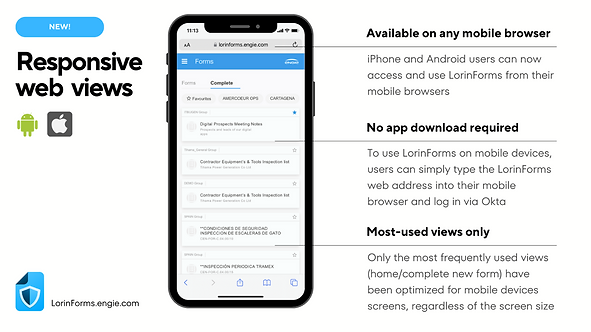
Web responsive views (web) We have also released the new web responsive views. The LorinForms.engie.com views can now adapt and adjust to fit the screen size and resolution of various mobile devices, such as smartphones and tablets.
Version 3.0.2 - February 2023
🆕 Form auto-assignment flag for coordinators, 🔒 Private comments for coordinators, and 🔧UI/UX improvements
-
Form auto-assignment (web/mobile) From Profile > Forms auto-assignment, coordinators will be able to turn off/on the functionality to assign new forms and change the status of a form automatically. The flag was set OFF as default for all the coordinators, now you will be able to open forms without changing their status automatically.
-
Private Comments for coordinators (web/mobile)Coordinators will be able to leave PRIVATE comments in forms. The PRIVATE comments will only be available for other coordinators, basic users won’t see the PRIVATE comments.
-
UI/UX improvements and bug fixes (web/mobile)We have released bug fixes and improvements that were reported by users since last release.